What Is a QR Code? A Complete Beginner's Guide
Quick Answer
What Is a QR Code?
A QR code is a type of matrix barcode - a machine-readable label that encodes data in a grid of dark and light squares. Unlike traditional one-dimensional barcodes that store data in a single row, QR codes use two dimensions (horizontal and vertical) to pack far more information into a compact space. QR codes are an open standard - anyone can create and use them without paying licensing fees.
How QR Codes Work
Every QR code is built from a 2D matrix of small squares called "modules." Together, these modules encode data using several key components:
- Finder patterns - The three large squares in the corners help scanners locate and orient the code, even when it's rotated or viewed at an angle.
- Timing patterns - Alternating dark and light modules between the finder patterns establish the grid's coordinate system.
- Data modules - The remaining modules encode the actual content (URL, text, WiFi credentials, etc.) using binary patterns.
- Error correction - Redundant data built into the code allows it to remain scannable even when partially damaged or obscured. A code can restore up to about 30% of its damaged codewords, though a covered area such as a logo must be smaller than that.
The picture below shows where each part sits on a real code. It also marks three parts that the list above does not mention: the alignment pattern, the format information, and the quiet zone.
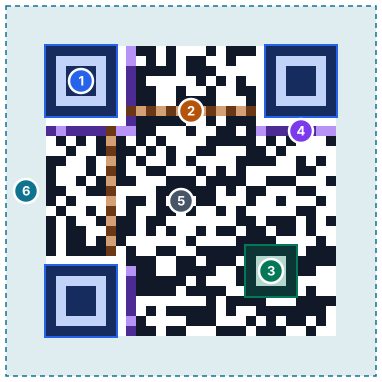
- Finder patterns - The three large squares in the corners. They let a scanner find the code and tell which way up it is.
- Timing patterns - Lines of alternating dark and light modules between the finders. They set the grid spacing so the scanner knows where each module sits.
- Alignment pattern - The smaller square near the bottom right. It helps the scanner correct for tilt or a curved surface. Version 2 and larger codes have at least one.
- Format information - 15 bits stored twice next to the finders. They record the error correction level and the mask pattern.
- Data and error correction - Everything else. It holds your content plus extra codewords that let a scanner rebuild damaged parts.
- Quiet zone - The blank margin around the code. The standard calls for at least 4 modules on every side.
Want a deeper technical breakdown? Read our full guide on how QR codes work.
Advertisements
Types of QR Codes
QR codes can be categorized in two ways: by their architecture (static vs dynamic) and by the type of data they encode.
Static vs Dynamic
- Static QR codes encode the destination directly into the image. They never expire and require no ongoing service.
- Dynamic QR codes use a redirect URL that can be changed later, but depend on a third-party service to keep working.
Learn the full differences in our static vs dynamic QR codes comparison.
By Data Type
- URL - Opens a website in the browser
- WiFi - Connects the device to a wireless network automatically
- vCard - Saves a contact to the phone's address book
- Calendar event - Adds an event to the device's calendar
- Location - Opens a geographic coordinate in a maps app
- Payment - Initiates a payment or displays account details
Common Uses for QR Codes
QR codes have become part of everyday life. Here are the most popular use cases:
- Marketing and advertising - Print QR codes on posters, flyers, and billboards to drive traffic to landing pages or promotions.
- Restaurant menus - Replace paper menus with a restaurant QR code that links to a digital menu.
- Business cards - Add a business card QR code so contacts can save your details instantly.
- WiFi sharing - Let guests connect to your network by scanning a WiFi QR code instead of typing a password.
- Payments - Display QR codes at checkout for mobile payment platforms.
- Event tickets - Use an event QR code for fast check-in at conferences, concerts, and meetups.
- Product packaging - Link to manuals, warranty registration, or ingredient lists.
How to Create a QR Code
Creating a QR code takes seconds. Here's how to do it with Link2QR:
- Go to link2qr.com - Open the free QR code generator.
- Choose a type - Select URL, WiFi, vCard, or another data type.
- Enter your content and download - Paste your URL or fill in the details, then download your QR code as a PNG or SVG.
No sign-up required, no watermarks, and the resulting code never expires.
How to Scan a QR Code
Most modern smartphones can scan QR codes using the built-in camera app - no separate app needed. Simply open your camera, point it at the QR code, and tap the notification that appears to open the link or take action.
Need help? See our step-by-step guide on how to scan a QR code, or try our free online QR code scanner.
Sources
- ISO/IEC 18004:2024, QR code bar code symbology specification, ISO, 2024
- History of QR Code, DENSO WAVE
- QR Code development story, DENSO WAVE
Frequently Asked Questions
What does QR stand for?
QR stands for Quick Response. The name reflects the code's ability to be scanned and decoded almost instantly by a smartphone camera or dedicated reader.
Are QR codes free to use?
Yes, QR codes are an open standard with no licensing fees. Creating them is completely free with Link2QR - no account or subscription required.
Can QR codes store any type of data?
Yes - QR codes can store URLs, plain text, WiFi credentials, contact information (vCards), calendar events, geographic locations, and more. The type of data determines what action your device takes when scanning.
What app do I need to read a QR code?
None, on most modern phones. Both iPhone and Android build QR scanning into the default camera app - just point the camera at the code and tap the notification that appears. See our full scanning guide for older devices and troubleshooting.
How much data can a QR code hold?
A single QR code can store up to 4,296 alphanumeric characters. However, shorter data produces simpler codes that are easier to scan reliably, especially at small print sizes.