QR codes encode data in a square grid of modules, sized from Version 1 (21x21 modules) to Version 40 (177x177 modules) - each step up adds 4 modules per side. Static QR codes embed the destination URL directly in that grid; the URL cannot be changed after generation. Dynamic QR codes encode a short redirect URL that points to a server-controlled destination, allowing URL changes post-printing but requiring ongoing server infrastructure. Reed-Solomon error correction determines damage tolerance: levels L, M, Q, and H restore roughly 7%, 15%, 25%, and 30% of damaged codewords, and a covered area such as a logo must stay smaller than those figures. Dynamic codes enable tracking via redirect layer analytics, while static codes require destination-side analytics integration.
What QR Codes Are: Technical Encoding
QR (Quick Response) codes are 2D barcodes that encode data in a matrix of black and white squares. Each square represents a binary bit. The code contains:
Position markers (finder patterns): Three large squares in corners for orientation detection
Timing patterns: Alternating modules that help scanners calculate matrix size
Alignment patterns: Smaller square patterns added from Version 2 onward, and in growing numbers at higher versions, to correct perspective distortion on larger grids
Format information: Error correction level and mask pattern metadata
Data region: The actual encoded content (URL, text, vCard, etc.)
Error correction codes: Reed-Solomon redundancy for damage tolerance
Every symbol also needs a quiet zone: a blank margin at least 4 modules wide on all four sides. Scanners use this empty border to detect where the code starts and stops - crop or cover it and decoding fails even if every data module is intact.
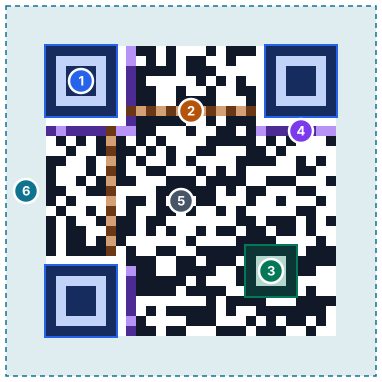
A real Version 3 code (29 x 29 modules, error correction M) for link2qr.com/what-is-a-qr-code, made with Link2QR.
1Finder patterns: 7 x 7 modules in three corners. Across the center they read dark-light-dark-light-dark in a 1:1:3:1:1 ratio, which is what scanners search for.
2Timing patterns: Row 6 and column 6 alternate dark and light between the finders and fix the module coordinates.
3Alignment pattern: 5 x 5 modules. Version 3 has one, centered at module (22, 22); larger versions add more.
4Format information: 15 bits (2 for the error correction level, 3 for the mask pattern, 10 BCH check bits), stored twice.
5Data and error correction codewords: 8-bit codewords placed in two-module-wide columns in a zigzag from the bottom-right corner, then masked.
6Quiet zone: At least 4 modules of blank margin on every side.
Versions 7 and up also carry two 6 x 3 blocks of version information.
QR Code Versions, Modules, and Data Capacity
The ISO/IEC 18004 standard defines 40 sizes, called versions. Version 1 is a 21x21 module grid; each version up adds 4 modules per side, following modules = 4 x version + 17, up to Version 40 at 177x177 modules. A generator picks the smallest version that fits the data plus the chosen error correction level, so short content (a phone number) stays a low version and long content (a paragraph of text) pushes to a higher one.
Version
Modules per side
Byte-mode capacity: L
M
Q
H
1
21x21
17
14
11
7
2
25x25
32
26
20
14
3
29x29
53
42
32
24
5
37x37
106
84
60
44
10
57x57
271
213
151
119
15
77x77
520
412
292
220
20
97x97
858
666
482
382
25
117x117
1273
997
715
535
30
137x137
1732
1370
982
742
40
177x177
2953
2331
1663
1273
Figures are the official per-version character maximums in 8-bit byte mode (ISO/IEC 18004). Byte mode is what a typical https://link2qr.com/... URL uses, because QR's more compact Alphanumeric mode only covers digits, uppercase A-Z, and the symbols space $ % * + - . / : - it excludes lowercase letters, so any URL with a lowercase path falls back to byte mode. At the largest size, Version 40-L, the absolute maximums are 7,089 numeric digits, 4,296 alphanumeric characters, or 2,953 bytes.
Error correction is layered on top of version and adds Reed-Solomon redundancy codewords, which is why capacity drops as the level rises from L to H at the same version - the extra redundancy takes up space that would otherwise hold data.
Mask Patterns
Before a QR code is finalized, the encoder XORs the data region against each of 8 standard mask patterns and scores the result for problems that confuse scanners - long runs of the same color, patterns that look like a finder square, and imbalanced dark/light ratios. It keeps whichever mask scores lowest, then records the choice in the format information so any scanner can undo it before reading the data.
Mask
Invert module when
0
(row + column) mod 2 = 0
1
row mod 2 = 0
2
column mod 3 = 0
3
(row + column) mod 3 = 0
4
(floor(row / 2) + floor(column / 3)) mod 2 = 0
5
((row x column) mod 2) + ((row x column) mod 3) = 0
6
(((row x column) mod 2) + ((row x column) mod 3)) mod 2 = 0
7
(((row + column) mod 2) + ((row x column) mod 3)) mod 2 = 0
Row and column are 0-indexed positions within the data region. A generator tries all 8, scores each, and embeds only the winning mask's 3-bit identifier - the mask formulas above are not something you configure by hand.
Advertisements
Static vs Dynamic QR Architecture
Static QR Codes
Static codes encode the destination URL directly into the QR pattern. When a user scans the code, their device decodes the pattern and opens the embedded URL immediately.
Dynamic codes encode a short redirect URL (e.g., short.link/abc123) that points to a server. The server maintains a database mapping each short code to a destination URL. When scanned, the redirect server logs the scan and forwards the user to the current destination.
Characteristics:
Short redirect URL embedded in QR pattern
Destination URL stored on external server
Destination can be changed post-printing via server update
Creates simpler, more scannable patterns regardless of final URL length
Requires ongoing server infrastructure and maintenance
Inherent tracking via redirect layer (time, location, device, etc.)
Fails permanently if redirect service shuts down
Redirect Layer Mechanics
The redirect layer is the server infrastructure that powers dynamic QR codes. When a QR code is scanned:
Scanner decodes the short redirect URL from the QR pattern
User's device makes HTTP request to redirect server
Server logs scan metadata (timestamp, IP, user agent, referrer)
Server looks up destination URL in database by short code
Server returns HTTP 301/302 redirect response
User's device follows redirect to final destination
This architecture introduces an extra network hop - and therefore some latency - plus a single point of failure. If the redirect service experiences downtime or shuts down permanently, all QR codes pointing to it become non-functional.
Tracking & Scan Attribution Logic
Dynamic Code Tracking:
Timestamp: Server logs exact scan time
Geolocation: Derived from IP address (city-level accuracy)
Device type: Parsed from user agent string (iOS, Android, desktop)
Browser: Extracted from user agent
Referrer: Source context if scan occurs via link click rather than camera
Campaign tagging: UTM parameters can be appended to destination URLs
Static Code Tracking:
Static codes have no inherent tracking because there's no redirect layer. Tracking requires:
Levels L, M, Q, and H restore about 7, 15, 25, and 30 percent of codewords, and capacity and damage tolerance trade off against each other at every version. In practice:
L suits digital displays and pristine prints where nothing will obscure the code.
M is the general-purpose default used when no logo or heavy wear is expected.
Q fits industrial or outdoor signage exposed to dirt, scratches, or weather.
H is required when embedding a logo, since the logo permanently obscures part of the code.
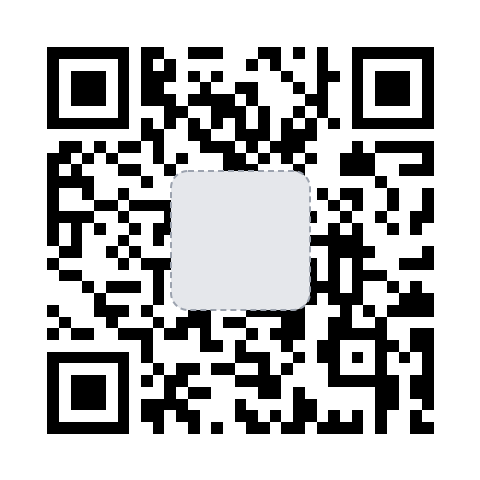
Higher error correction adds redundancy codewords, so the same data needs a larger version with more modules. If embedding a logo that covers the center of the code, use H-level correction and keep the logo well under 20% of the code area. In our test an H-level code stopped decoding once a centered square covered more than 19% of it, so leave a margin and test the printed code.
What we measured: how much can you cover?
To see how much of a code you can cover at each level, we generated the same link, https://link2qr.com/how-qr-codes-work, at every level with Link2QR's /api/qr endpoint. We covered the center with a gray square, the way a logo does, and grew the square in 1% steps of the symbol area. After each step we checked the code with jsQR, the open-source decoder that our /decode and /scanner tools use. The figures show the largest square each code survived.
L: read with 4% covered (Version 3, 29 x 29)M: read with 7% covered (Version 3, 29 x 29)Q: read with 13% covered (Version 4, 33 x 33)H: read with 19% covered (Version 5, 37 x 37)
Two things stand out. First, every level survived less than its nominal recovery of about 7%, 15%, 25%, and 30% for L, M, Q, and H. Recovery is counted in codewords, not area. Each codeword is 8 modules, so a square cuts into more codewords than its share of the area, and each error correction block can only repair a fixed number of codewords. Second, higher levels made the code denser for the same link, from 29 x 29 modules at L to 37 x 37 at H, so it needs more print size for the same scan distance. These results come from one decoder (jsQR), and phone cameras can read more or less. If you plan to add a logo, see the logo QR code guide.
Print Permanence vs Destination Mutability
Scenario
Static QR
Dynamic QR
Permanent signage
Ideal (no ongoing cost)
Unnecessary complexity
Event with changing schedule
Poor fit (must reprint if URL changes)
Ideal (update destination remotely)
Product packaging
Best for known-stable URLs
Only if tracking ROI justifies ongoing cost
Marketing campaign with A/B testing
Not viable
Essential for redirect-based testing
Common Deployment Mistakes
Using dynamic codes when static would suffice: Adds cost and single-point-of-failure risk unnecessarily
Printing QR codes smaller than 2cm × 2cm: Scanning failure on older devices
Using low error correction for outdoor signage: Weather damage renders codes unscannable
Not testing scans from multiple devices before mass printing: Device-specific scanning issues discovered too late
Embedding a logo that covers about 20% of the code or more: Beyond what H-level correction recovered in our test (19%)
Using dynamic QR services without exit strategy: Vendor lock-in with no URL portability
Placing QR codes on curved or reflective surfaces: Glare and distortion prevent scanning
Buyer Checklist Before Selecting a QR Generator
Do you need to change the destination URL after printing?
No → Use static QR codes (free, zero maintenance)
Yes → Requires dynamic QR infrastructure (ongoing cost)
Do you need scan analytics?
No → Static with basic destination analytics via Google Analytics
Yes → Dynamic with redirect-layer tracking, or static with UTM parameters
What is your print environment?
Digital display or pristine indoor → L or M error correction
Outdoor, industrial, or logo embedding → Q or H error correction
What is your expected QR code lifespan?
Months → Dynamic acceptable if budget allows
Years → Static preferred (no vendor dependency risk)
Do you control the destination domain?
Yes → Static codes work perfectly
No (third-party URL) → Dynamic may be required if URL structure is unpredictable
What is the difference between static and dynamic QR codes?
Static QR codes encode the destination URL directly in the QR pattern itself. The URL cannot be changed after printing. Dynamic QR codes encode a short redirect URL that points to a server-controlled destination, allowing you to change where the code directs users even after printing.
Why do some QR codes stop working after printing?
Static QR codes never stop working unless the destination URL itself goes offline. Dynamic QR codes can stop working if the redirect service shuts down, your subscription expires, or the redirect server has technical issues. This is the primary risk of dynamic QR infrastructure.
What error correction level should I use for printed QR codes?
For print materials that may get damaged or dirty, use H (high) error correction, which can restore up to about 30% of damaged codewords. In practice a covered area such as a logo must be smaller: a centered square stopped decoding above 19% in our test. For digital displays or pristine print conditions, L (low) at 7% is sufficient and creates simpler codes.
How many QR code versions are there and what do they mean?
The ISO/IEC 18004 standard defines 40 versions, from Version 1 (21x21 modules) to Version 40 (177x177 modules). Each version adds 4 modules per side. A generator automatically picks the smallest version that fits your data at the error correction level you chose - you don't select it directly.
What is a QR code mask pattern?
A mask pattern is an XOR transformation applied to the data region before the final code is drawn. There are 8 standard masks; the encoder scores all 8 for scanner-unfriendly features (long runs of one color, false finder-like shapes) and keeps the best-scoring one, recording the choice in the format information.